Sticky notes on your wall

washi·pad

Your Paper Wall

A simple sticky-note wall. Jot a thought, peel a fresh sheet, arrange it on the wall.

  • ✓Peel & jot — tap to pull a fresh sheet, type, pick a washi-pastel colour.
  • ✓Speak & check off — dictate a note, or turn it into a checklist and tick things off.
  • ✓On your Home Screen — widgets keep your freshest notes in sight.
  • ✓A living wall — notes flow into balanced columns, hand-tilted with a strip of tape.
  • ✓Photos between paragraphs — drop an image right into a note.
  • ✓Yours, on your device — notes live on your phone and sync free through your own iCloud. No account needed.
  • ✓On any computer — with Washipad Cloud, your wall opens at app.washipad.com and syncs with Android too.

Free. Everything on your phone, iCloud sync included. Washipad Cloud — your wall on any computer and on Android — is $0.49/month or $4.99/year.
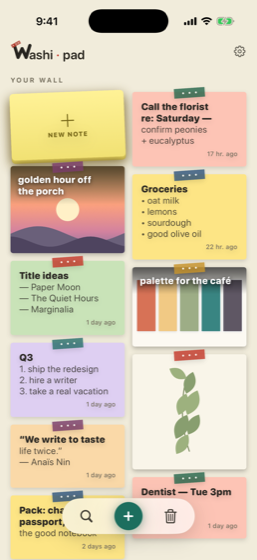
Washipad sticky-note wall

Questions

Is Washipad free?

Yes. The wall, your notes and photos, and iCloud sync between your Apple devices are free, with no account needed. The only purchase is the optional Washipad Cloud subscription, $0.49/month or $4.99/year, which syncs your wall with Android and opens it in the browser at app.washipad.com.

Where are my notes stored?

On your device. On iPhone and iPad they also sync through your own private iCloud, which we cannot read. Your notes reach our servers only if you subscribe to Washipad Cloud.

What devices does Washipad run on?

Washipad is on iPhone and iPad from the App Store, and on Android from Google Play. With Washipad Cloud, your wall also opens in the browser at app.washipad.com.

Does Washipad work offline?

Yes. Your notes live on your device, so you can read and write with no connection. Syncing catches up when you are back online.

Do I need an account to use Washipad?

No. Open it and start sticking notes. An account is only needed for Washipad Cloud.

How do I cancel Washipad Cloud?

Cancel any time in your Apple Account subscriptions or in Google Play. Your stored notes stay readable at app.washipad.com, and syncing resumes if you subscribe again.

Is there a Washipad app for Mac?

There is no separate Mac app. On a computer, open your wall in the browser at app.washipad.com with Washipad Cloud.

Also from Washi

washi·doc

Your Paper Desk

Fix this PDF in 30 seconds.

A fast, native document editor. Edit the real text — not just sticky annotations — sign, redact, and ship.

washidoc.com